Settings & View Options
Every setting on this reference is a per-view option — you set it on a specific TaskNotes Gantt view through its view-settings menu, and it's saved with that view. The menu is organized into the same collapsible groups used here.
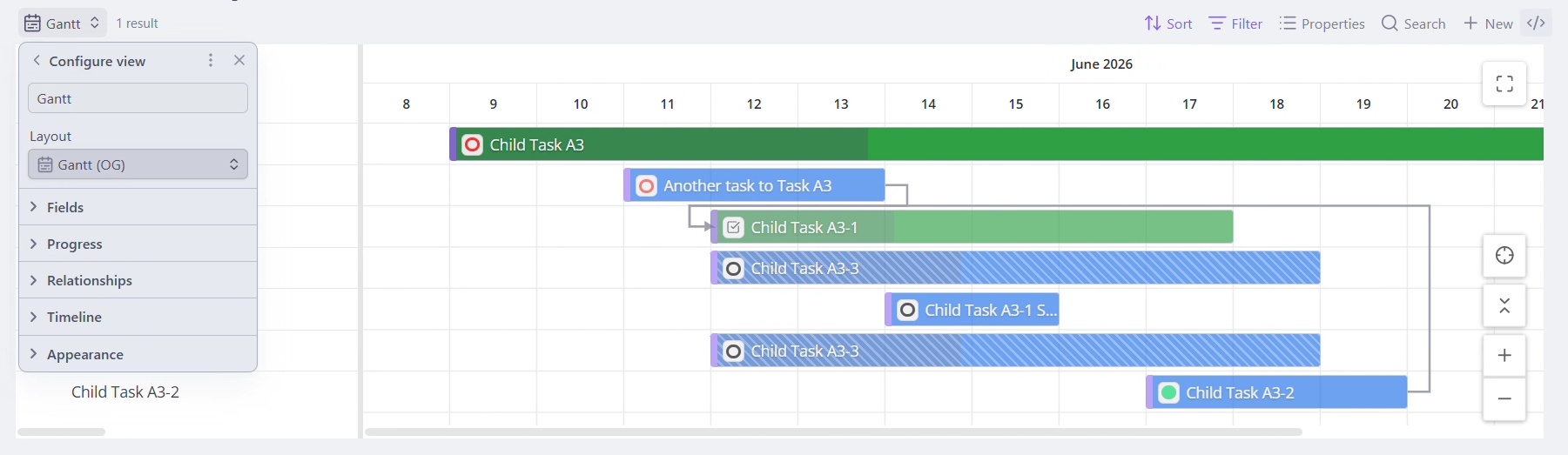
The groups
| Group | What it controls |
|---|---|
| Fields | Which note properties supply the task name, dates, parent, status, priority, and time estimate. |
| Progress | Where a bar's progress comes from and whether you can edit it. |
| Relationships | How related tasks pulled in for context are shown. Companion only. |
| Timeline | Scale, duration, weekend shading, dependency arrows, parent-date cascade, and missing-date handling. |
| Appearance | Bar colors and icons, date indicators, toolbar, and layout sizing. |
| Calendar items | Recurring instances, time entries, timeblocks, property-based events, and external calendars as read-only bars. |
Companion vs. standalone
Some settings only make sense when TaskNotes is installed (companion mode) — the whole Relationships group, Progress mode, Time Estimate Update, and the status/priority color and icon sources. Those are omitted or fall back to a neutral default in standalone mode, and are marked Companion only throughout this reference. See Core Concepts → The two modes.
Property names are yours, not ours
The Gantt never hard-codes property names. Every "Property" setting under Fields lets you point the Gantt at whatever property your notes (or TaskNotes) actually use.
Leave a field blank to use its default
You don't have to fill everything in. Any Property or text field you
leave blank falls back to the default documented for it — for example,
leave Start Date Property blank and the Gantt uses TaskNotes' scheduled.
Each field below states exactly what its blank/default behavior is.